
Most websites do not have one isolated SEO problem.
They have a mix of issues: important pages are not indexed, service pages do not match search intent, blogs get traffic but do not support leads, internal links are weak, or a contact form creates friction on mobile.
That is why I do not treat an SEO audit as a long list of tool warnings.
When someone requests a free website SEO audit through Lyf Tech, I review the site to find the issues most likely to limit qualified traffic, enquiries, bookings, or sales. Then I sort those findings by what needs attention first.
A missing meta description on an old tag page is rarely urgent.
A core service page set to noindex, a broken mobile form, or a website with no clear path from helpful content to a service page is urgent.
This guide explains how I audit websites, what I check, and how I turn the findings into a practical SEO roadmap.
What Is an SEO Audit?
An SEO audit is a structured review of your website’s ability to:
- Be found, crawled, and indexed by search engines
- Rank for relevant searches
- Give users a useful answer or clear reason to choose your business
- Build trust
- Turn visits into leads, enquiries, bookings, or sales
A proper audit should not just say, “You have duplicate titles” or “Your page speed needs improvement.”
It should explain:
- What is wrong
- Why it matters
- Which pages or templates it affects
- What should be fixed first
- How the change connects to business results
Google’s own guidance makes this clear: SEO is about helping search engines understand a site while helping people find useful information and decide whether to visit. There is no secret setting that guarantees rankings. Google’s SEO starter guide is worth reading if you want the basics directly from the source.
What I Look for in a Free Website SEO Audit
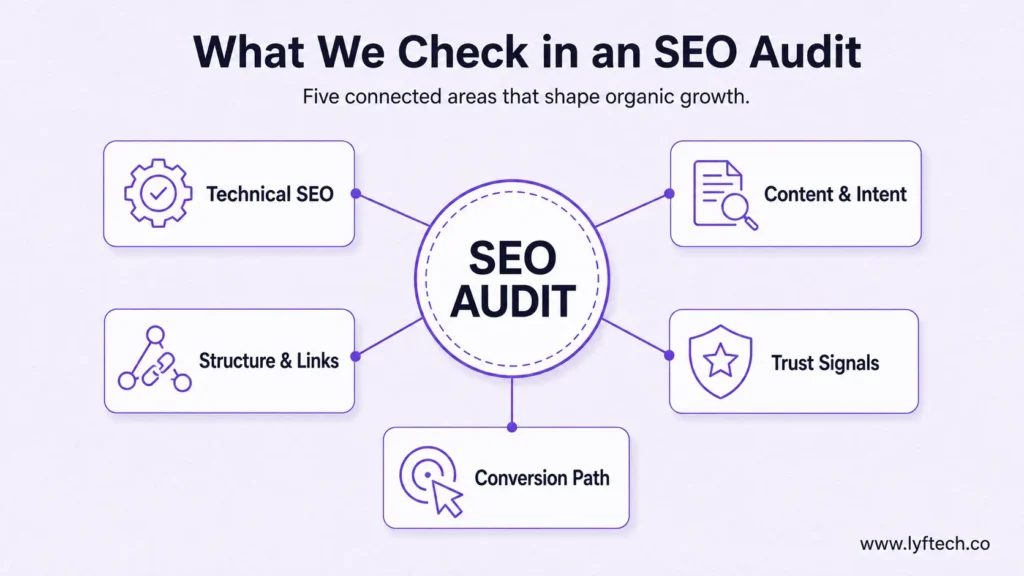
Every website is different, but my manual review normally covers five connected areas:
- Technical SEO and indexability
- Content quality and search intent
- Website structure and internal linking
- Trust signals and page credibility
- Conversion gaps and user journey issues
For local businesses, ecommerce stores, and larger content websites, I also look at the areas that matter most for that specific model, such as local visibility, category-page structure, filters, product duplication, or topical coverage.
The goal is not to find every tiny imperfection.
The goal is to identify the biggest blockers and the most realistic growth opportunities.
Step 1: I Start With the Business, Not the SEO Tool
A website can look technically healthy and still fail commercially.
For example, imagine a business receives traffic to low-intent blog posts while its highest-value service pages are invisible, unclear, or hard to reach. A generic crawl report will not tell you that this traffic mix is the real problem.
Before I judge any issue, I need context.
I look for answers to questions such as:
- What does the business actually sell?
- Which services, products, or locations matter most?
- Who is the ideal customer?
- What action should an organic visitor take?
- Is the goal a phone call, form submission, booking, quote request, sale, or demo?
- Which pages already bring leads?
- Has the site recently been redesigned, migrated, or rebranded?
- Which competitors come up in real sales conversations?
This context changes the priorities.
Five broken links on an old blog archive may not matter much.
Five core service pages with weak content, poor internal linking, or indexing issues can directly limit revenue.
Step 2: I Check What Is Already Working
Before recommending changes, I look for evidence.
A website may have more opportunity than its owner realizes. It may already rank on page two for commercially useful terms. It may have blog posts earning impressions but no internal links to relevant service pages. Or it may be losing visibility on pages that previously performed well.
When access is available, I review data from Google Search Console and Google Analytics, including:
- Organic clicks and impressions
- Search queries
- Top landing pages
- Indexed pages
- Branded versus non-branded visibility
- Device and country trends
- Conversion activity
- Pages with high impressions but low click-through rates
- Pages receiving traffic but producing few or no enquiries
I prefer reviewing at least six to twelve months of data where possible.
A 30-day snapshot can be misleading. Some businesses are seasonal. Others may have had a temporary spike from a campaign, a news mention, or one unusually successful article.
I have seen websites report healthy organic traffic growth while their main service pages were quietly declining. The total looked positive, but the traffic that mattered to the business was moving in the wrong direction.
That is why I do not judge SEO from one headline number.
Step 3: I Review Technical SEO and Indexing Barriers
Technical SEO is the foundation.
If search engines cannot access, render, crawl, or index important pages, strong content alone will not fix the problem.
This does not mean every technical warning is an emergency. I focus on the issues affecting valuable pages, important templates, or a large section of the site.
For a deeper breakdown, read my technical SEO guide.
Can Search Engines Reach Important Pages?
First, I check whether key pages can be found through normal internal links and whether anything is blocking access.
This includes reviewing:
- robots.txt rules
- XML sitemaps
- Internal links
- Navigation and crawl paths
- Server responses
- JavaScript-dependent content or links
- Parameter URLs and filter pages
- Redirects
- Broken pages
Google usually discovers pages through links from pages it already knows, while sitemaps can help highlight the URLs you care about. Google’s documentation on site discovery and crawling explains this process.
I ask simple but important questions:
- Can a visitor and crawler reach the main service, product, and category pages?
- Are priority pages buried deep in the website?
- Are internal links pointing to old redirected URLs?
- Is the site creating endless low-value filter or parameter URLs?
- Are important links only available after a user interaction?
Are Important Pages Actually Indexed?
A page cannot rank if it is not indexed.
I review indexability issues such as:
- Accidental noindex tags
- Canonical tags pointing to the wrong URL
- Soft 404 pages
- Error pages
- Duplicate or near-duplicate content
- Pages blocked by robots directives
- Sitemap URLs that redirect or return errors
- Google-selected canonicals that differ from the intended version
An accidental noindex tag on a template can quietly remove a whole set of pages from search results.
This is one reason an audit needs more than a quick glance at traffic. A business might not notice the issue until important pages disappear from search.
Are Redirects and Canonicals Clean?
Duplicate URLs can appear because of:
- HTTP and HTTPS versions
- www and non-www versions
- Trailing slashes
- Tracking parameters
- Sort and filter pages
- Product variants
- Pagination
- Old URLs after a redesign
I check whether the site sends users and search engines toward one preferred version of each important page.
A canonical tag is helpful, but it needs to match the site’s internal links, sitemap, and redirect logic. A website sends mixed signals when its sitemap says one URL is important while internal links point to another.
Is the Mobile Experience Usable?
Google uses the mobile version of content for indexing, but mobile usability matters beyond SEO.
I manually test key journeys on a phone:
- Navigation
- Service-page readability
- Buttons and tap targets
- Popups
- Forms
- Phone links
- Checkout or booking paths where relevant
I often find issues here that tools miss.
A form may technically exist but fail to submit on a mobile device. A button may be difficult to tap. A popup may cover the content. These are not minor design details if they stop a ready-to-buy visitor from contacting the business.
Are Speed and Core Web Vitals Affecting Important Pages?
I review page speed and user-experience signals with attention to the pages that matter most.
Common issues include:
- Large, uncompressed hero images
- Slow hosting or server response times
- Heavy scripts
- Too many third-party tools
- Layout shifts
- Unnecessary plugins
- Large video embeds
- Slow ecommerce templates
I do not recommend spending weeks chasing a perfect audit score.
The priority is to fix speed and stability problems that hurt priority pages and real users.
Step 4: I Audit Content Against Search Intent
A technically clean website can still struggle if its pages do not satisfy the people searching.
This is where many websites lose the opportunity.
A page may contain the target keyword, have a long word count, and still fail because it is the wrong format, too generic, outdated, or disconnected from the reader’s real question.
My on-page SEO guide explains how to improve individual pages once you know what they need to achieve.
Does Each Important Page Match the Search?
I compare priority pages with the live search results.
For example:
| Search | What the searcher usually needs |
| “SEO audit checklist” | A practical checklist or guide |
| “technical SEO services” | A service page with proof, process, and CTA |
| “best CRM for small business” | A comparison or list |
| “plumber near me” | A local service result with strong local trust signals |
| “how much does roof repair cost” | A useful cost guide with clear context |
A page can be well written and still rank poorly if it does not match the search intent.
I do not assume intent from the keyword alone. I look at what Google is already showing because the live results often reveal whether people want a guide, service page, category page, tool, comparison, local business, or video.
Is the Content Actually Helpful?
I look for content that answers the main question early, gives useful detail, uses examples where needed, and provides a clear next step.
I also look for pages that sound generic.
Thin content is not only about word count.
A focused 500-word answer can work well for a narrow question. A 3,000-word page can still be weak if it repeats common advice without insight, proof, examples, or clear guidance.
Google recommends creating content that is helpful, reliable, people-first, and built with original value rather than repackaging what already exists. Its people-first content guidance is a useful standard for this review.
Are There Thin, Outdated, or Overlapping Pages?
During an audit, I look for pages that need one of four decisions:
- Improve
- Merge
- Redirect
- Remove
Examples include:
- Old location pages with only the city name changed
- Product pages copied from a manufacturer
- Articles with outdated statistics or screenshots
- Multiple blog posts competing for the same keyword and purpose
- Pages that no longer match the business offer
Content overlap is not always a problem.
The problem starts when multiple pages target the same search intent and compete against each other. This can dilute internal links, confuse search engines, and make it harder to decide which page should be the main resource.
Are There Content Gaps Worth Filling?
I compare the site’s content with the questions people ask before buying.
That could include:
- Service comparisons
- Pricing or cost guides
- Buyer guides
- FAQs
- Case studies
- How-to articles
- Industry-specific service pages
- Product comparison pages
- Local information pages
But I do not recommend creating content simply because a competitor has it.
The page needs to serve a real audience need and connect to a business goal.
For a structured approach, see my guide to topical authority.
Step 5: I Check Website Structure and Internal Links
Internal linking is one of the most overlooked parts of SEO.
It helps visitors move from one useful page to the next. It also helps search engines understand how pages relate and which pages matter most.
During a free SEO audit, I check for:
- Orphan pages with little or no internal-link support
- Important service pages disconnected from blog content
- Broken internal links
- Generic anchor text such as “click here”
- Guides that do not point readers toward the next relevant resource
- Old links going through redirects
- Category pages with weak internal-link support
- Pages that are too deep in the site structure
A good website should feel connected.
For example, a guide about technical SEO should naturally link to a technical SEO service when a reader may need help implementing fixes. A blog post about content planning can link to SEO content and blog management where it makes sense.
The link has to help the reader. It should not be forced into the paragraph just to add another internal link.
Step 6: I Review Trust Signals and Page Credibility
SEO is not only about whether a page can rank.
It is also about whether a visitor believes the page, trusts the business, and feels comfortable taking the next step.
This matters even more for businesses asking people to spend money, submit personal details, book a treatment, request a quote, or make a financial decision.
I review areas such as:
- Clear About and contact pages
- Real business details
- Founder, author, and reviewer information
- Author expertise that can be verified
- Case studies and original experience
- Clear privacy, terms, editorial, or refund policies where relevant
- Reviews and third-party mentions
- Accurate claims
- Credible sources for factual content
I pay close attention to vague claims such as “best,” “leading,” “trusted by thousands,” or “number one.”
If a claim cannot be supported, it should be replaced with something specific or removed.
Trust is built through clarity and proof, not exaggerated wording.
Step 7: I Check Whether the Website Can Turn Traffic Into Results
Traffic is not the final goal.
A website needs to help the right visitor understand the offer and take action.
This is why I review conversion paths during every audit.
Is the Main Offer Clear?
A visitor should quickly understand:
- What the business offers
- Who it is for
- Why it may be a good fit
- What action to take next
That does not mean forcing every detail above the fold.
It means avoiding confusion. A visitor should not need to scroll through vague marketing statements to learn what the company actually does.
Are CTAs Matched to Intent?
Not every visitor is ready to buy.
A person reading an informational guide may benefit from a related resource, checklist, case study, or service page. A person landing on a commercial page may be ready to request a quote, book a consultation, or submit an enquiry.
I review whether the calls to action match the page intent.
A hard sales CTA on every informational blog post can feel disconnected. At the same time, a service page without a clear next step leaves qualified visitors with nowhere to go.
Do Forms, Buttons, and Tracking Work?
I test important actions rather than trusting the dashboard alone.
That can include:
- Contact forms
- Quote forms
- Booking forms
- Phone links
- Checkout
- Thank-you pages
- CRM delivery
- Conversion-event tracking
A site can appear to have low conversion rates when the real problem is broken form tracking or a failed email notification.
Those are some of the highest-priority findings because they can affect revenue immediately.
How I Prioritize SEO Audit Findings
This is the most important part of the audit.
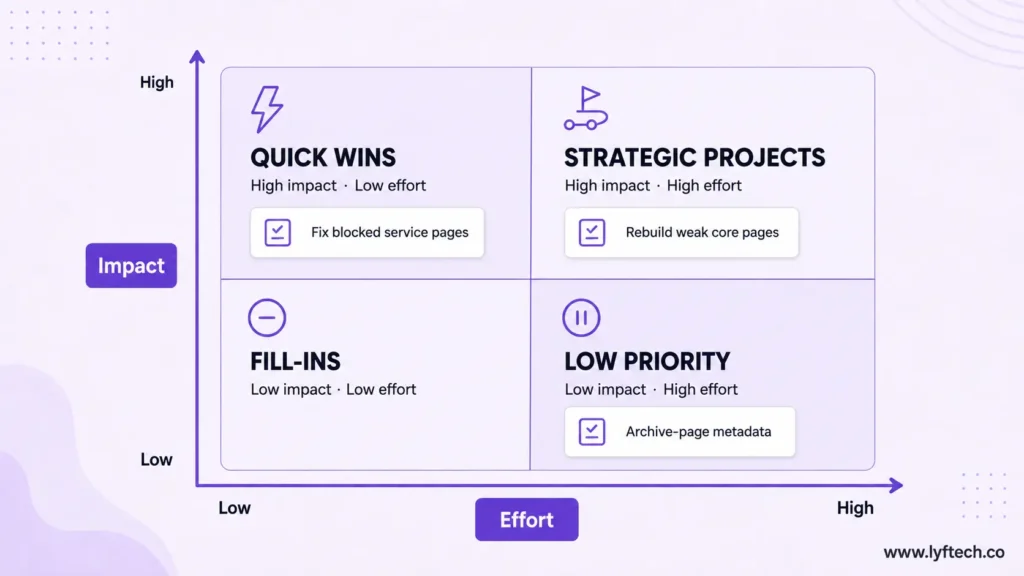
A report with 200 findings does not help a business if every task looks equally urgent.
I prioritize each issue based on:
- Business impact
- Search impact
- Confidence in the diagnosis
- Urgency
- Number and value of pages affected
- Effort required
- Risk of making the change
| Priority | What it means | Example |
| Critical | Fix immediately | Core service pages blocked from indexing, broken mobile form, security issue |
| High | Major growth opportunity | Weak service pages, missing internal links, strong intent mismatch |
| Medium | Useful supporting improvement | Content refreshes, structured-data fixes, moderate speed gains |
| Low | Monitor or fix later | Cosmetic metadata issue on a low-value archive page |
A key principle: page value matters more than URL count.
Five broken pages that drive leads can matter more than 5,000 low-value filter URLs.
What the Roadmap Looks Like After an Audit
I prefer a roadmap based on dependencies and impact rather than separate, disconnected “technical” and “content” lists.
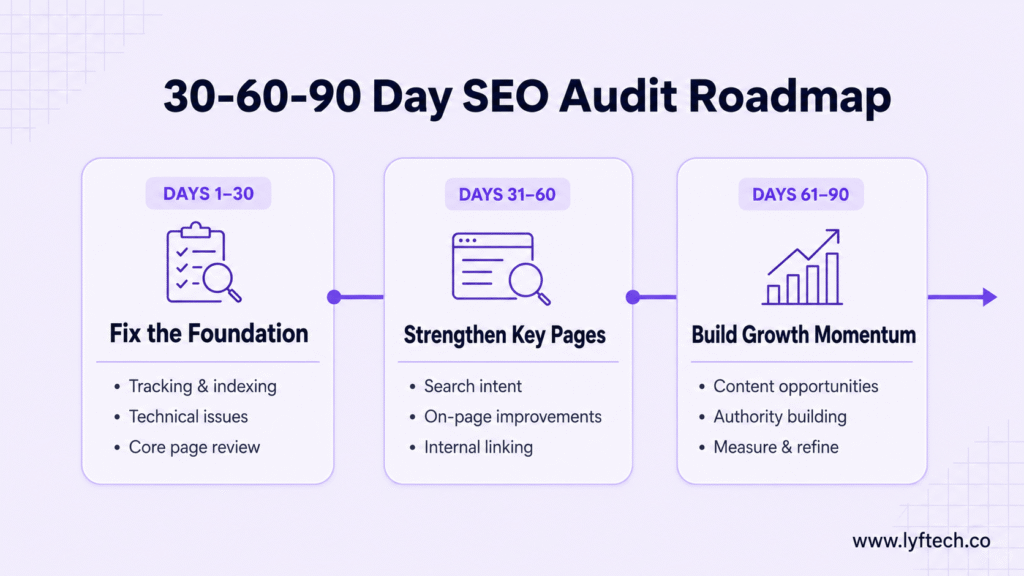
Read my link-building guide for a practical view of authority building.
That is where a documented SEO strategy becomes important. The audit tells you what is holding the site back. The strategy decides what to do next and in what order.
Common SEO Audit Mistakes
Treating Every Tool Warning as Important
Tools are useful for gathering data. They do not understand which pages generate revenue, what a business is trying to sell, or whether an issue is intentional.
Starting With a Crawl Before Understanding the Business
This produces technically correct recommendations with no commercial context.
Ignoring Conversion Tracking
You cannot accurately judge SEO performance if form submissions, calls, bookings, or sales are not tracked correctly.
Prioritizing by URL Count
The highest number of affected URLs is not automatically the most important issue.
Recommending More Content for Every Gap
Sometimes the best move is improving, merging, or redirecting existing pages.
Writing “Improve E-E-A-T” Without Specific Actions
A useful recommendation explains what proof, author details, sources, policies, reviews, or case studies are missing.
Promising Rankings
No honest audit can guarantee rankings, traffic, or leads. An audit identifies evidence-based opportunities and risks. Results depend on competition, implementation quality, timing, authority, and many other factors.
Website SEO Audit Checklist
A practical checklist to find the technical, content, visibility, trust, and conversion issues that may be limiting your website.
Frequently Asked Questions
What does an SEO audit include?
A complete SEO audit reviews technical health, crawlability, indexing, website structure, content quality, search intent, internal links, trust signals, conversion paths, and competitor gaps.
Can an automated SEO tool audit my website?
It can identify issues such as broken links, missing metadata, redirects, and duplicate tags. It cannot judge business priorities, search intent, content usefulness, trust, or conversion problems. Tools provide data; the audit requires judgement.
How often should I run an SEO audit?
A small, stable website may only need a detailed audit once or twice a year, alongside ongoing monitoring. Larger ecommerce sites or websites that change frequently need more regular, focused reviews.
What should I fix first after an SEO audit?
Start with issues that have the highest business impact and urgency. Indexing problems, broken forms, security issues, tracking failures, and weak high-value pages usually come before cosmetic fixes.
Is an SEO audit the same as an SEO strategy?
No. An audit diagnoses what is happening now. An SEO strategy turns those findings into a plan for growth.
Get a Free SEO Audit
At Lyf Tech, I personally review websites to identify the technical, content, page-structure, internal-linking, trust, and conversion issues that may be holding them back.
I focus on practical findings, not generic automated reports.
If you want me to identify the biggest SEO growth problems on your website, request a free SEO audit. There is no obligation to purchase a service, and no guaranteed rankings, just an honest review of where your website stands and what deserves attention first.
You can also review our SEO services or book a consultation.
Written by Muhammad Daniyal, Founder and SEO & Content Strategist at Lyf Tech. Last reviewed: July 2026.