Good on-page SEO is not about adding a keyword to the title, H1, and first paragraph.
A page can tick those boxes and still fail because it targets the wrong search intent, buries the answer, gives no proof, has weak internal links, or leaves the visitor with no clear next step.
When I audit websites, this is one of the first things I check.
I often find pages that are “SEO optimized” on paper but do not rank, convert, or support the wider website strategy. The problem is usually not one missing keyword. It is that the page does not fully do the job the searcher arrived to complete.
That is what on-page SEO should fix.
What Is On-Page SEO?
On-page SEO is the work you do directly on a page to help search engines understand it and help visitors get what they came for.
It includes the visible parts of a page, such as:
- The headline and heading structure
- Main copy
- Images, videos, and tables
- Internal and external links
- FAQs
- Calls to action
- Trust signals and proof
It also includes page-level technical elements, including:
- Title tags
- Meta descriptions
- URL structure
- Canonical tags
- Robots directives
- Structured data
- Image alt text
Google describes SEO as helping search engines understand content while helping people find a site and decide whether to visit it. There is no hidden setting that automatically puts a page at the top of the results. Google’s SEO starter guide makes that point clearly.
Create a page that is easy to understand, useful for the searcher, connected to the rest of your website, and built to move the right visitor forward.
On-Page SEO vs. Technical SEO
These two areas overlap, but they are not the same.
| On-page SEO | Technical SEO |
| Improves the relevance and usefulness of individual pages | Makes it possible for search engines to crawl, render, and index the site properly |
| Covers titles, headings, copy, links, visuals, proof, and CTAs | Covers redirects, sitemaps, crawlability, JavaScript, site architecture, and indexation |
| Focuses on what the page says and how it helps the visitor | Focuses on whether search engines can access and interpret pages at all |
| Includes contextual links within content | Includes wider site structure and template-level issues |
For example, improving a weak service page so it clearly explains the offer is on-page SEO.
Finding that every service page has accidentally been set to noindex is technical SEO.
In reality, both areas matter. A great page cannot perform if Google cannot index it. A technically healthy page will also struggle if it does not answer the searcher’s question.
For the technical side, read my technical SEO guide.
Give Every Page One Main Job
Before changing a title tag or adding another paragraph, define what the page is supposed to achieve.
I use this question:
Who is this page for, what are they trying to do, and what should they do next?
A page should have one dominant purpose.
For example:
“This page helps service-business owners understand local SEO, explains the main visibility and conversion factors, and directs suitable readers toward our local SEO services.”
That is much clearer than trying to make one page a beginner guide, a sales page, a case study, and a comparison article at the same time.
Here is how I think about common page purposes:
| Page type | Main job | Suitable next step |
| Blog guide | Teach or solve a problem | Read a related guide, use a checklist, or explore a relevant service |
| Service page | Help a visitor decide whether to enquire | Request an audit, book a call, or contact the business |
| Product page | Help a buyer evaluate and purchase | Add to cart or view product options |
| Category page | Help shoppers compare available products | Browse products or filter options |
| Local landing page | Show local relevance and make contacting easy | Call, request a quote, or book |
| Comparison page | Help someone make a decision | View the recommended option or related solution |
When a page tries to serve several conflicting jobs, it usually becomes unclear for both users and search engines.
Start With Search Intent, Not Keyword Placement
Search intent is the reason someone typed a query into Google.
The quickest way to understand it is to search the query yourself before writing or editing the page.
Look at what is ranking:
- Are the results mainly guides?
- Are they service pages?
- Are there product categories?
- Does Google show local businesses or a map pack?
- Are videos, tools, calculators, or comparison pages prominent?
- Which questions and subtopics keep appearing?
The live results do not tell you to copy competitors. They show you the format and level of detail people usually expect.
| Search query | Likely intent | Page format that usually fits |
| “What is technical SEO?” | Learn a concept | Beginner guide |
| “Technical SEO checklist” | Complete a process | Checklist or practical guide |
| “SEO audit services” | Hire an expert | Service page |
| “Best CRM for small business” | Compare options | Comparison or list article |
| “Plumber near me” | Find a local provider | Local service page |
| “How much does roof repair cost?” | Understand cost before buying | Cost guide with a clear service path |
A keyword tool may label all three of these as “informational”:
- What is technical SEO?
- Technical SEO checklist
- Technical SEO audit template
But they require different pages.
That distinction matters more than a keyword-density target ever will.
Build a Search Intent Brief Before You Write
For important pages, I recommend creating a short brief before working on copy.
Write down:
- Primary topic or search query
- Searcher’s likely goal
- Best page format
- Main question the page must answer
- Supporting questions to cover
- What proof or examples the reader needs
- Logical internal links
- Most suitable CTA
For a service page, the brief may look like this:
| Element | Example |
| Primary topic | Local SEO services |
| Searcher goal | Find a provider who can improve local search visibility |
| Best format | Service page |
| Main question | Can this agency help my business appear in local results? |
| Proof needed | Process, experience, testimonials, results, FAQs |
| Next step | Request a free SEO audit |
This prevents one of the most common mistakes I see: publishing a page without knowing what success looks like.
Write a Title Tag That Makes the Page Clear
A title tag is usually one of the main sources Google uses for the clickable headline in search results. Google may rewrite it when another page element better represents the content, so clarity matters more than trying to force an exact formula.
A useful title should be:
- Unique to the page
- Accurate
- Easy to understand
- Specific enough to set the right expectation
- Written for a real person deciding whether to click
Weak vs. stronger title tags
| Weak | Stronger |
| On-Page SEO | On-Page SEO Guide: Improve Rankings and Conversions |
| SEO Services | SEO Services for Service Businesses |
| Local SEO Tips | Local SEO Guide for Small Businesses |
| Technical SEO | Technical SEO Guide: Fix Crawling and Indexing Issues |
Avoid:
- Repeating the same keyword twice
- Using the same title across multiple pages
- Adding the current year to every evergreen page
- Making claims the page cannot prove
- Writing vague titles such as “Grow With Confidence”
A title should tell someone exactly what they will get after the click.
Use Meta Descriptions to Support the Click
Meta descriptions do not directly decide rankings. However, they can help a searcher understand whether your result answers their question.
Google may use your meta description or generate its own snippet from page content. Either way, write a clear summary rather than stacking keywords.
A good meta description usually includes:
- The topic
- The main benefit or outcome
- What the page covers
- A reason to choose this result
For example:
Learn how to optimize pages for search intent, visibility, trust, and conversions with a practical on-page SEO process beyond keyword placement.
I pay special attention to pages that already have strong impressions but weak click-through rates in Google Search Console. In many cases, the page is visible but the title and snippet do not make the value clear enough.
Keep URLs Short, Descriptive, and Stable
A clean URL helps users understand what a page is about.
For this topic:
/on-page-seo-guide/
is better than:
/blog/complete-ultimate-on-page-seo-optimization-guide-tips-2026/
Keep URLs:
- Lowercase
- Easy to read
- Related to the topic
- Free from unnecessary words and dates
- Stable over time
Do not change an established URL only to make it slightly shorter. If the page already has links, traffic, or rankings, the small benefit rarely justifies redirect risk.
Use One Clear H1 and Logical Headings
The H1 confirms that the visitor landed in the right place.
It does not need to match the title tag word for word, but both should describe the same topic.
For this guide:
- Title tag: On-Page SEO Guide: Improve Rankings and Conversions
- H1: On-Page SEO Guide: How to Optimize Pages for Search Intent and Conversions
Then use headings in a logical order.
| Heading level | Use it for |
| H1 | The main page topic |
| H2 | Main sections |
| H3 | Supporting points within an H2 section |
| H4 | Only when a deeper level is genuinely needed |
Poor heading structure often appears when several people have edited a page over time. You may see an H1 followed by H4s, then H2s, then H5s purely because headings were chosen for visual size.
That is not a content structure.
Use descriptive headings that tell the reader what is coming next. “Why It Matters” is vague. “Why Search Intent Matters for On-Page SEO” gives context immediately.
Answer the Main Question Early
A visitor should not need to scroll through several paragraphs of general marketing language before reaching the answer.
If someone searches “What is a canonical tag?”, define it in the opening section.
If they search “SEO services for dentists,” explain the service, who it is for, and how it works near the top of the page.
I remove introductions that could fit on any website, such as:
In today’s digital world, having a strong online presence is more important than ever.
That does not help the reader. It does not prove relevance. It only delays the useful part.
A better introduction does three things:
- Names the actual problem.
- Gives the reader a reason to keep reading.
- Confirms the page will help them complete their task.
Write Content That Completes the Searcher’s Job
There is no ideal word count for every page.
A narrow definition may need 300 words. A detailed implementation guide may need 3,000 words or more. The right length depends on what the reader needs to understand, decide, or do.
The mistake is writing to match a competitor’s word count instead of completing the task.
When I audit an underperforming page, I look for these issues:
- The answer is too vague
- Important questions are missing
- The page repeats basic advice without explaining how to apply it
- The information is outdated
- The content does not include real proof or examples
- The page is too long because it includes irrelevant sections
- The visitor has no clear next step
Good content usually includes at least one element that is difficult for a competitor to copy.
That could be:
- A first-hand example
- A real process
- An original checklist
- A screenshot from a tool
- A case-study insight
- A template
- A practical comparison
- A clear explanation based on real client work
Google’s guidance on helpful, reliable, people-first content supports this direction: create genuinely useful information instead of repackaging what already exists.
Cover the Topic Naturally Instead of Chasing Keyword Density
There is no fixed keyword-density percentage that makes a page rank.
Trying to reach one usually makes the writing repetitive and awkward.
A page about on-page SEO should naturally cover related concepts such as:
- Search intent
- Title tags
- Headings
- Internal links
- Content quality
- Structured data
- Mobile usability
- Calls to action
- Trust signals
Not because a tool labelled them “LSI keywords,” but because they are part of explaining the topic properly.
Use your primary keyword where it makes sense:
- URL
- Title tag
- H1
- Introduction
- Relevant headings
- Body copy
Then write normally.
Search engines can understand related language and context. Repeating the same phrase in every sentence makes the page harder to read and less credible.
Add Proof, Specificity, and Trust Signals
A visitor should be able to understand who is behind the page and why they should trust it.
This matters for every business, but it is especially important in health, legal, financial, ecommerce, and high-cost service decisions.
I look for:
- Clear author or business information
- Contact details
- About pages
- Real processes
- Testimonials, case studies, or reviews
- Accurate claims
- Original photos, screenshots, or examples where relevant
- Reliable sources for factual claims
- Clear policies for ecommerce and service websites
Avoid vague claims such as:
- “We are the best SEO agency.”
- “This strategy always increases rankings.”
- “Guaranteed results.”
Replace them with useful specifics.
For example:
Our SEO process includes a technical audit, search-intent research, priority-page improvements, content planning, internal linking, and monthly performance reviews.
Specific language is more believable because it can be checked.
Use Internal Links to Create a Clear Journey
Internal links are one of the most missed opportunities I see in content audits.
A good internal link helps a reader continue their journey. It also helps search engines understand how your pages relate.
For every important page, ask:
- Which pillar guide should link to this page?
- Which supporting pages should point toward it?
- What page should the visitor see next?
- Is the anchor text clear enough to set expectations?
Use descriptive anchor text.
Good:
- SEO audit guide
- technical SEO guide
- local SEO guide
- SEO strategy guide
Weak:
- Click here
- Learn more
- This page
- Read this
Internal links should not feel forced. You do not need to link every mention of a topic.
The best place for a link is where the reader is likely to need that next piece of information.
For example, a technical SEO article should link to a deeper technical guide. A blog post about improving service pages can link to a relevant SEO service where the visitor may need implementation help.
External Links Can Make a Page More Credible
Some site owners avoid external links because they worry about sending visitors away.
That is the wrong way to look at it.
A relevant link to an official document, original research source, or trusted industry resource can support your point and show readers where the information came from.
Link to the original source where possible.
For example, when explaining how structured data works, it makes sense to reference Google’s structured data documentation, rather than linking to a third-party article that only summarizes it.
Do not add external links just to add them. Every link should support the reader’s understanding.
Make Images, Visuals, and Tables Useful
Visuals should explain, prove, or simplify something.
I do not recommend adding generic stock images simply to break up text. A random image of people looking at a laptop does not help someone understand on-page SEO.
Useful visual assets include:
- Annotated screenshots
- Before-and-after examples
- Process diagrams
- Checklists
- Decision tables
- Comparison charts
- Page-layout examples
- Short videos showing a process
Place the visual close to the section it supports.
For images:
- Use descriptive filenames
- Compress files before uploading
- Write useful alt text
- Avoid stuffing keywords into alt text
- Make sure the image works well on mobile
For example, use:
“Example of a descriptive SEO title tag and meta description in a WordPress SEO plugin”
Not:
“Best on-page SEO title tag on-page optimization SEO keyword ranking”
Use Structured Data Correctly
Structured data helps search engines understand specific elements of a page.
It can make a page eligible for certain search features, but it does not guarantee rich results and it will not fix weak content.
Use markup that matches the visible page content.
Common examples include:
- Article or BlogPosting for guides
- Product and Offer for product pages
- LocalBusiness for local business information
- VideoObject for pages built around videos
- BreadcrumbList for clear breadcrumb paths
Be careful with FAQ schema.
FAQ content can still be useful for visitors, but Google’s visible FAQ rich-result eligibility is limited. Add FAQs because they answer real questions, not because you expect a special search feature.
Match the CTA to the Visitor’s Intent
A CTA should fit the page and the visitor’s stage of awareness.
Someone reading “What is SEO?” may not be ready to book a consultation. A related beginner guide, checklist, or audit resource may be more suitable.
Someone reading an SEO service page is much closer to making a decision. That page should make it easy to request an audit, book a consultation, or contact the business.
| Page type | Suitable CTA |
| Beginner guide | Read a related guide or download a checklist |
| Comparison article | View the recommended option or decision guide |
| Service page | Request an audit or book a consultation |
| Product page | Add to cart or view product details |
| Local landing page | Call, request a quote, or book an appointment |
CTA copy should describe the action clearly.
Weak:
- Submit
- Learn more
- Get started
Stronger:
- Request My Free SEO Audit
- Book an SEO Consultation
- View Our Technical SEO Process
Do not interrupt the reader with a sales banner after every section. One relevant, well-placed CTA is usually more effective than several generic ones competing for attention.
Forms and Conversion Paths Are Part of On-Page SEO
Traffic has little value if your main conversion path does not work.
When reviewing important commercial pages, I test:
- Contact forms
- Quote forms
- Booking forms
- Phone links
- Checkout steps
- Thank-you pages
- Confirmation emails
- Conversion tracking
I also test them on a real phone.
A form may look fine on desktop but fail on mobile. A button may be difficult to tap. A popup may cover the form. A required field may not be obvious. An email notification may never reach the business.
Those are not minor website issues. They can directly cost leads and sales.
Ask only for the information you genuinely need at the first step. A name, email, website URL, and short message are often enough for an initial enquiry.
Check the Actual Mobile Experience
A responsive website is not automatically a good mobile experience.
For every important page, check:
- Is the H1 visible and readable?
- Can users use the navigation easily?
- Do buttons have enough space around them?
- Are popups blocking the content?
- Are forms easy to complete?
- Do tables work on a smaller screen?
- Is the main CTA easy to find?
- Does the page load and remain stable?
This is one of the fastest ways to find genuine conversion blockers.
A page can pass a general mobile-friendly test while still frustrating the people who matter most: visitors trying to contact, book, or buy.
Page-Level Technical Checks to Include
Some technical checks are sitewide. Others should be reviewed at page level, especially when a page is not performing as expected.
Check that:
- The page is indexable
- It is not accidentally set to noindex
- The canonical URL is correct
- Internal links point to the preferred URL
- The page returns a proper status code
- Important content is visible without requiring a strange interaction
- The page is included in the XML sitemap where appropriate
- Structured data matches the visible content
- The mobile version contains the same useful content
- Large images, scripts, or embeds are not slowing the page unnecessarily
If a page is not indexed, do not start by rewriting the copy. First confirm that Google can crawl and index it.
On-Page SEO Priorities by Page Type
Service Pages
A service page should make the offer clear.
It needs:
- A clear description of the service
- Who the service is for
- Problems it helps solve
- Process or deliverables
- Relevant proof
- FAQs
- A direct CTA
Do not turn a service page into a broad beginner guide. Educational content is valuable, but the visitor should not have to scroll through 2,000 words before learning what you offer.
Product Pages
A product page needs more than copied manufacturer text.
Focus on:
- Accurate specifications
- Benefits in plain language
- Product options
- Pricing
- Delivery and returns
- Reviews or proof
- Clear purchase controls
- Helpful related-product links
Category Pages
A category page should help people browse and compare.
It needs:
- A clear category purpose
- Useful filters
- Product sorting that works properly
- Short supporting copy where it helps
- Clear internal links to subcategories and important products
Avoid placing a large wall of SEO copy above the products. It often creates friction for shoppers.
Local Landing Pages
Local pages need real local relevance.
Include:
- The services available
- Clear service-area information
- Local proof where available
- Accurate contact details
- Location-specific FAQs
- A relevant local CTA
Do not make dozens of pages where the city name is the only thing changed. That does not give the visitor a better answer.
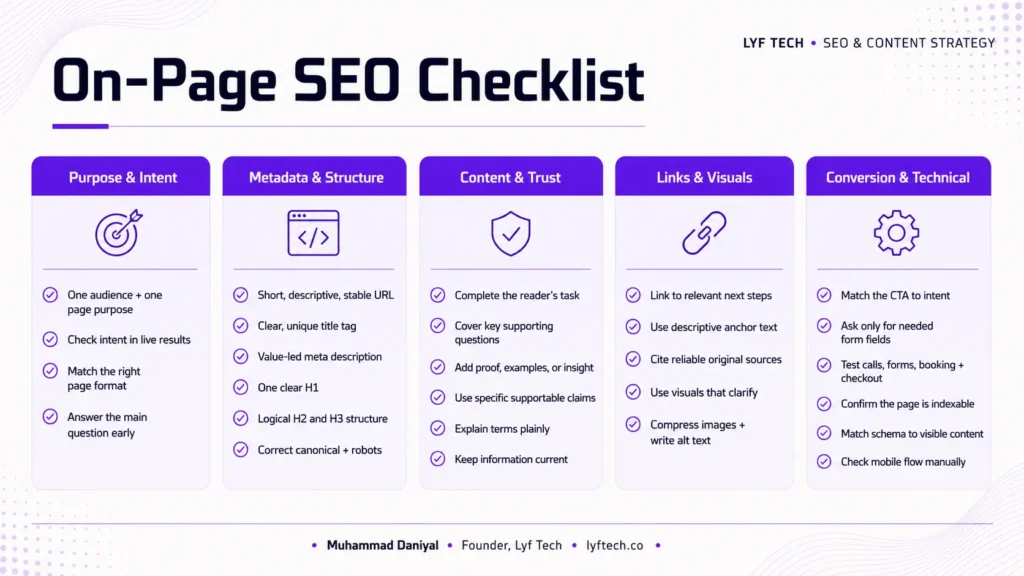
Blog Guides
A guide should answer the topic properly and connect the reader to the next useful page.
That may include:
- Related pillar content
- A checklist or template
- A relevant service
- A case study
- A practical CTA near the end
Common On-Page SEO Mistakes I See
Starting With Keywords Instead of Purpose
A keyword does not tell you what page to create. Start with the audience, their task, and the intent behind the search.
Writing for Word Count
Long content is not automatically useful. Remove filler. Add detail only when it helps the reader understand, decide, or act.
Repeating Exact Keywords Too Often
Keyword repetition makes copy awkward and does not create a stronger page. Use natural language and cover the topic properly.
Copying Competitor Headings
Competitor pages can show what readers expect. They should not become a template to copy. Bring your own experience, examples, structure, and point of view.
Leaving Pages Isolated
A useful page should connect to related pages through natural internal links. Do not publish a guide and leave it with no path to a relevant service, pillar page, or next resource.
Using Generic CTAs Everywhere
The right CTA depends on what the visitor is trying to do. A blog reader, service-page visitor, and ready-to-buy customer do not need the same next step.
Ignoring Mobile Forms and Buttons
Test the real journey yourself. A broken or frustrating mobile conversion path can waste the traffic your SEO work earned.
Frequently Asked Questions
What does on-page SEO include?
On-page SEO includes page purpose, search intent, titles, meta descriptions, headings, copy, images, internal links, external links, trust signals, calls to action, structured data, mobile usability, and page-level technical settings.
How many keywords should one page target?
Focus on one main topic and one dominant intent. A strong page can naturally rank for many related searches without treating every variation as a separate target.
Does the keyword need to be in the title and H1?
The topic should be clear in both. The wording does not need to match exactly, and it should never sound forced or misleading.
Is keyword density still important?
No fixed keyword-density percentage improves rankings. Write naturally, use relevant language, and make sure the page fully answers the searcher’s question.
Do meta descriptions affect rankings?
Meta descriptions are not a direct ranking factor. They can still help searchers understand your page and decide whether to click.
Does structured data guarantee rich results?
No. Structured data can make a page eligible for certain search features, but Google decides whether to display them.
How many internal links should a page have?
There is no fixed number. Add the links that genuinely help a reader reach a related resource, service, product, or next step.
Does every page need a CTA?
Every important page should offer a next step. That does not always need to be a sales CTA. A guide may direct readers to a checklist, related article, or supporting resource.
Final Thoughts
On-page SEO works best when you treat a page as a complete experience.
The title earns the click. The H1 confirms relevance. The content answers the question. Proof builds trust. Internal links connect the visitor to the rest of your site. The CTA gives them a useful next step.
Start with the page’s purpose and search intent. Then improve the elements that help the right visitor find, understand, trust, and act on the page.
If you are unsure whether your priority pages have an intent problem, content gap, internal-linking issue, or conversion blocker, request a free SEO audit. I will review the pages most likely to affect your visibility and enquiries, then show you what deserves attention first.
Written by Muhammad Daniyal, SEO & Content Strategist and Founder of Lyf Tech.