SEO is not about finding a clever trick, placing a keyword everywhere, and waiting for rankings to appear.
After five years of working on local-business websites, ecommerce stores, content-led projects, and service brands, I have learned that SEO growth usually comes from doing the fundamentals better and more consistently than competitors.
That means understanding why someone searched, building the right page for that need, making the page genuinely useful, and giving visitors a clear next step.
I have seen internal-linking fixes improve discovery of important pages. I have seen a clearer service-page structure improve enquiries without new backlinks. I have also seen sites publish dozens of articles that never had a real chance because they targeted the wrong intent or offered nothing different.
Search Strategy and Keyword Planning
1. Start with search intent, not just the keyword
A keyword is only a starting point. Before creating a page, work out what the searcher is actually trying to do.
Someone searching “what is technical SEO” likely needs an explanation. Someone searching “technical SEO services” is looking for a provider. Trying to serve both needs with the same page often creates a weak result for everyone.
2. Let the search results guide the page format
I check the live results before writing. They reveal whether Google is currently favouring guides, product pages, service pages, tools, comparisons, videos, or local results.
Do not copy the ranking pages. Use them to understand the job your page needs to complete, then create a more useful version.
3. Group keywords by meaning and intent
Do not create a separate page for every small keyword variation.
If “SEO audit checklist,” “website SEO audit checklist,” and “SEO audit steps” all lead to the same type of answer, they normally belong on one strong page. Separate pages only when the search intent, audience, or solution is materially different.
4. Prioritise topics that matter to the business
High search volume does not automatically mean high value.
I prioritise topics based on relevance to the offer, commercial potential, current site strengths, and whether the business can genuinely help the person searching. A lower-volume service query can be worth far more than a broad traffic keyword with no buying intent.
5. Give every page one dominant job
Before approving a page, decide what it is supposed to do.
It may educate a new visitor, support a commercial decision, rank for a local service, sell a product, or strengthen a topic cluster. A page trying to do all of those jobs at once usually becomes unfocused.
6. Build topic clusters instead of isolated posts
One good article rarely creates lasting topical coverage by itself.
Build a useful main guide, then support it with focused articles, service pages, comparisons, case studies, or tools. Connect them with sensible internal links so readers can move deeper into the subject.
For example, a local SEO cluster could include a local SEO guide, Google Business Profile optimisation, local landing pages, review strategy, and local keyword research.
7. Check whether you can add something new
Before publishing, ask: “Why would someone choose this page over the results already available?”
Your answer may be a first-hand example, a clearer framework, original data, a template, screenshots, a comparison table, or experience that helps readers make a better decision. If the answer is only “we used the same headings,” the page needs more work.
8. Do not mistake search volume for certainty
Keyword tools estimate demand. They do not guarantee traffic, rankings, or leads.
Use volume as one input, then validate it with the live SERP, Google Search Console, customer questions, sales calls, and the business’s actual offer.
9. Plan commercial and informational pages together
Informational content can introduce people to a problem. Commercial pages help ready buyers assess a solution.
Both matter, but they need a clear connection. A guide about fixing crawling issues should naturally point people toward a relevant technical SEO service or audit when they need help implementing the work.
10. Use competitor research to find gaps, not to clone pages
Competitor pages show what searchers may expect. They should not become your content template.
Look for weak explanations, missing questions, dated examples, vague claims, poor structure, or a lack of proof. Then make your page more useful in ways a reader can actually notice.
Content That Earns Attention and Trust
11. Answer the main question early
Do not spend five paragraphs warming up to the answer.
State the core answer or solution near the top, then explain the details. A reader should quickly know they landed on the right page.
12. Write to complete the task, not to reach a word count
There is no ideal article length.
A simple definition may need 400 words. A practical guide may need 3,000. Include what a reader needs to understand, decide, or act—then remove the rest.
13. Add first-hand experience where it helps
Experience makes advice more credible when it is specific and honest.
Instead of saying “internal links are important,” explain what you reviewed, what changed, and what you learned. For example, on content-led websites, I often find that valuable pages are buried or unsupported; improving the internal paths gives both readers and search engines a clearer route to them.
14. Support factual claims with reliable sources
Link to the original source whenever you make a claim that needs evidence.
For SEO advice, Google’s own documentation should usually come before a third-party summary. Google’s guidance on helpful, reliable, people-first content is a useful reference point for content standards.
15. Use plain language
Good SEO writing should be easy to understand.
Short sentences, clear headings, examples, and practical steps usually help more than technical-sounding language. Explain necessary terms instead of assuming every reader already knows them.
16. Write title tags for the right click
A title tag should make the page’s value clear before someone visits.
Avoid vague titles such as “Grow With Confidence.” Use a specific title that matches the page and search intent, such as “Technical SEO Checklist: 18 Issues to Check.” Do not repeat the same keyword or reuse titles across important pages.
17. Treat meta descriptions as a click-supporting summary
Meta descriptions are not a direct ranking factor, and Google may rewrite them. They can still help a searcher understand what the page covers.
Write a concise summary with the topic, a benefit, and a clear expectation. Do not stuff it with keyword variations.
18. Use one clear H1 and logical headings
Your H1 should confirm the main topic. H2s should organise the major sections, and H3s should support them.
Choose headings for meaning, not visual size. A clean heading structure makes content easier to scan and easier to maintain when the page grows.
19. Make key answers easy to find
Use short definitions, numbered steps, comparison tables, and direct answers under descriptive headings where they genuinely help.
Do this for readers first. Clear formatting may also make it easier for search systems to identify the relevant part of a page, but it is not a promise of a featured result.
20. Update, consolidate, or remove weak content
Do not chase new content while ignoring the pages you already own.
Use Search Console and analytics to find pages with falling clicks, weak click-through rates, outdated information, overlapping intent, or no clear role. Improve the page, merge it with a stronger equivalent, redirect when appropriate, or remove it if it provides no value.
On-Page Optimisation and Site Architecture
21. Use internal links as part of the strategy
Internal links help readers continue their journey and help search engines understand how pages relate.
Important pages should not be isolated. Link from relevant guides, category pages, service hubs, navigation, and related articles where the next step makes sense. My internal linking guide explains how to plan this properly.
22. Make anchor text descriptive
The link text should tell people what they will find after the click.
“Technical SEO checklist” is more useful than “click here.” Vary anchors naturally based on the sentence; do not force exact-match keywords into every link.
23. Keep important pages close to the site’s main paths
If a valuable page can only be reached after several obscure clicks, it is harder for people to find and easier for it to be overlooked.
Use clear navigation, category hubs, breadcrumbs, contextual links, and relevant related-page modules to surface important pages.
24. Keep URLs readable and stable
Use short, descriptive URLs such as /seo-tips/ rather than long, dated, or cluttered slugs.
Do not change a well-performing URL just to make it prettier. Redirects and historical links add risk, and a minor slug improvement rarely creates a meaningful gain.
25. Match the CTA to the reader’s intent
Not every article visitor is ready to book a call.
A beginner guide may point to a checklist or related resource. A commercial page should make it easy to request an audit, call, book, or buy. The next action should feel useful rather than interruptive.
26. Use visuals that explain or prove something
Generic stock photos rarely make a page better.
Prefer annotated screenshots, process diagrams, examples, decision tables, product images, original photos, or short videos that help the reader understand the point.
27. Optimise images without stuffing alt text
Compress images, use suitable dimensions, and write alt text that describes the image’s purpose.
For example: “Google Search Console report showing rising non-brand clicks” is helpful. A string of repeated SEO keywords is not.
28. Use structured data only when it matches visible content
Structured data can help Google understand certain page elements and make a page eligible for supported rich results. It does not guarantee that a rich result will appear.
Use the correct markup for the page, keep it aligned with what visitors can see, and validate it. Google’s structured data guidelines are the reference to follow.
29. Make service, product, category, and guide pages do different jobs
A service page should explain the offer, who it is for, the process, proof, FAQs, and a direct CTA.
A product page needs accurate specifications, price, options, shipping, returns, proof, and purchase controls. A category page should make browsing easy. A guide should answer the topic and lead to the next relevant resource.
30. Build trust into important pages
On pages where visitors must spend money, share information, or make a high-stakes decision, show who is behind the content or business.
Use real author or company information, contact details, policies, testimonials, case studies, qualifications where relevant, and precise claims that can be checked. Trust is not a badge you add at the end; it is the result of clear, honest information throughout the page.
Technical SEO and User Experience
31. Check crawlability and indexability before rewriting a weak page
If a page is not being crawled or indexed, writing more copy will not solve the main problem.
Check the URL Inspection report, robots directives, status code, canonical, internal links, and whether the important content is accessible to Google before changing the content strategy.
32. Handle duplicate pages with clear canonicals
Duplicate or near-duplicate URLs can confuse which version should appear in search.
Use a consistent preferred URL, internal links to that version, sensible redirects where needed, and rel=canonical where appropriate. Do not use robots.txt as a canonicalisation tool; Google specifically advises against it.
33. Use XML sitemaps for discovery, not as a ranking lever
Include the canonical URLs you want search engines to discover, particularly on larger or newer sites.
However, a sitemap does not guarantee crawling or indexing. It supports discovery; it does not replace useful content, clean internal links, or proper technical access.
34. Fix the page experience problems that frustrate real visitors
Page experience is broader than a single speed score.
Look for intrusive pop-ups, unstable layouts, hard-to-read text, broken mobile tables, unclear navigation, difficult forms, and content hidden behind interactions. Test the actual page on a phone, not only in a tool.
35. Improve speed where it affects people
Slow pages can lose visitors and harm conversions, especially on mobile.
Prioritise heavy images, unnecessary scripts, poor hosting, render-blocking elements, and layout shifts that visitors notice. Do not spend weeks chasing a tiny performance score improvement while ignoring an unclear offer or a broken form.
36. Make sure primary content is available without user interaction
If essential text, products, or links require a click, swipe, or form interaction to load, search systems may not see them reliably.
This matters on JavaScript-heavy sites. Check rendered pages and make sure the mobile version contains the same useful primary content as desktop.
37. Use Google Search Console every week
Search Console is one of the most useful free tools available to site owners.
I use it to spot rising queries, pages with high impressions but weak clicks, indexation issues, sudden drops, coverage gaps, and content-update opportunities. Regular review helps you act on evidence instead of guesses.
38. Use URL Inspection after important changes
After a major rewrite, migration, canonical fix, or new key page, inspect the URL.
Confirm Google can access the page, see the expected canonical, and render the important content. Request indexing selectively for high-priority URLs rather than treating it as a publishing ritual for every small edit.
39. Test the full conversion path yourself
SEO traffic is not useful if a visitor cannot call, submit a form, book an appointment, or complete checkout.
Test the journey on desktop and mobile. Check thank-you pages, confirmation emails, phone links, calendar tools, payment steps, and tracking. I have seen good traffic wasted because the real conversion path simply did not work.
40. Treat local SEO as its own discipline
Local SEO needs more than adding city names to pages.
Your business details must be accurate, the service-area information must be clear, local pages need genuine local usefulness, and the Google Business Profile must align with the website. For service businesses, these basics can matter more than publishing another generic blog post.
41. Earn real reviews and respond to them
Reviews influence trust and can support local decision-making.
Ask real customers for honest feedback through a repeatable process. Never buy or fabricate reviews. Reply professionally, thank people for useful feedback, and handle complaints with care.
Authority, AI Search, and Measurement
42. Earn links for relevance and trust, not raw volume
Backlinks still matter, but a long list of weak or irrelevant links is not a strategy.
Focus on genuinely useful pages, relevant industry relationships, digital PR, expert contributions, original data, and resources people would naturally want to cite.
43. Make the page worth linking to before promoting it
Outreach cannot rescue an average page with no clear reason to exist.
Before promoting content, improve the substance: add original examples, useful data, a tool, a template, a strong visual, or a specific angle that solves a real problem.
44. Build a brand people can verify
Search visibility is stronger when people can understand who the business is, what it does, and why it is credible.
Keep your name, business details, policies, expert profiles, social profiles, customer proof, and public information consistent. Do not chase fake “brand mentions.” Earn genuine ones by doing work worth discussing.
45. Use AI as a drafting and research assistant, not a publishing shortcut
AI can help with research organisation, outlines, content gaps, first drafts, and editing support.
It cannot replace subject knowledge, fact-checking, original examples, strategic judgment, or responsible publishing. Publishing many generic AI pages without added value creates a quality problem, not a scalable content system.
46. Do not chase AI-search hacks
AI search is changing how people discover information, but the fundamentals still apply: pages need to be crawlable, technically sound, helpful, accurate, and distinct.
For Google Search, there is no special markup, “chunking” method, or llms.txt file that improves visibility in its generative features. Google’s own AI-search guidance says to focus on core SEO and unique value.
47. Write for readers first, while making answers clear
Use clear topic framing, descriptive headings, direct answers, useful visuals, and credible sources. These habits help people understand your content and make it easier for search systems to connect the right information with the right query.
Do not rewrite every page around speculative AEO or GEO formulas. Better content and a stronger technical foundation are the safer long-term investment.
48. Track conversions, not just rankings and clicks
Rankings and traffic are useful diagnostic metrics. They are not the final goal.
Set up tracking for the actions that matter: qualified forms, calls, booked consultations, purchases, revenue, subscriptions, or demos. Then check that those actions are recorded correctly.
49. Judge lead quality, not only cost per lead
A cheap lead that never becomes a customer is not a win.
Work with sales or customer-service teams to understand which pages and queries bring qualified enquiries, closed sales, repeat customers, and profitable work. This makes your SEO reporting far more useful to the business.
50. Build repeatable SEO systems
The best strategy is one a team can maintain.
Use practical templates for content briefs, page launches, internal-link reviews, technical checks, reporting, and content updates. A simple process followed consistently beats an ambitious plan that disappears after two weeks.
51. Keep improving what is already useful
SEO is not a finish line.
The strongest sites keep reviewing priority pages, updating examples, fixing technical issues, improving conversion paths, and expanding topics where users need more help. Consistent usefulness is still the closest thing SEO has to a durable advantage.
What I Have Learned From Real SEO Work
The websites that grow are rarely relying on one perfect tactic.
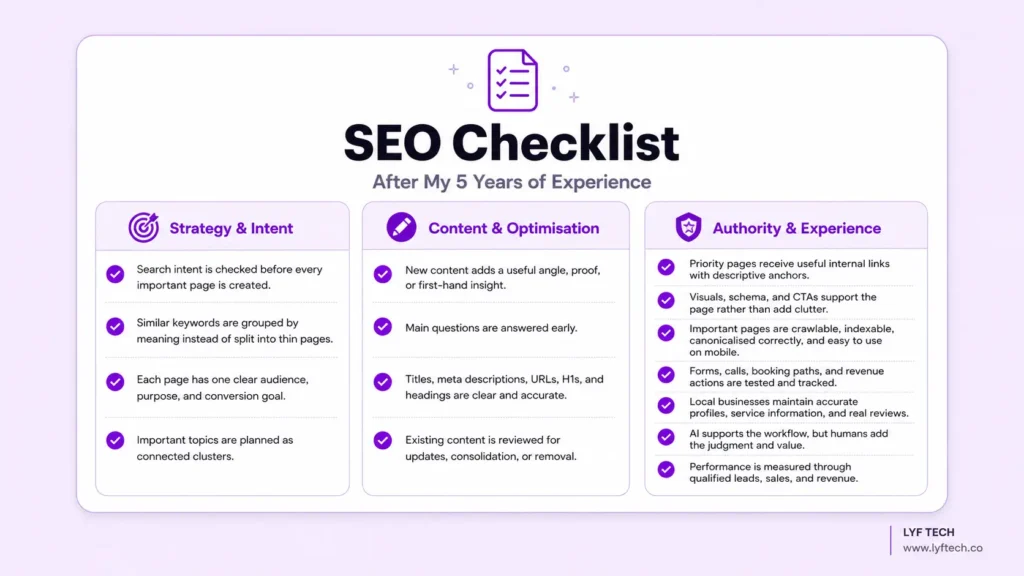
They get the fundamentals right: search intent, page purpose, useful content, internal links, technical access, trust, and conversion paths. Then they keep improving those areas over time.
That is the kind of SEO I believe in. It is less exciting than a shortcut, but it produces a website that is easier to trust, easier to use, and far more likely to keep creating qualified opportunities.
Frequently Asked Questions
Is SEO still worth it in 2026?
Yes. People still use search to research problems, compare options, find local businesses, and buy products or services. The work has changed, but the core goal is the same: make your website the most useful and trustworthy answer for the right audience.
What is the most important SEO tip for beginners?
Start with search intent. Before writing or optimising a page, check what the searcher wants and what type of result is currently ranking. This prevents a large number of avoidable mistakes.
How long does SEO take to show results?
It depends on your starting point, competition, technical condition, site history, content quality, and the value of the topic. Some changes can show movement within weeks; meaningful growth commonly takes months, especially for newer sites. Read my full guide on how long SEO takes for a realistic breakdown.
Are backlinks still important?
Yes, but quality, relevance, and legitimacy matter far more than a raw link count. Build pages people would actually want to reference, then earn attention through useful work and real relationships.
Does AI-written content hurt SEO?
AI content is not automatically a problem. Generic, inaccurate, scaled, or unedited content is. Use AI to support a quality editorial workflow, then add human expertise, fact-checking, original insight, and a useful final answer.
How many internal links should a blog post have?
There is no fixed number. Add the internal links that genuinely help a reader reach the next relevant guide, service, product, or supporting page. Relevance matters more than a quota.
Do I need special files or schema for AI search?
No special file or schema guarantees inclusion in AI-generated search experiences. Follow standard SEO best practices, publish original helpful content, make priority pages crawlable, and use supported structured data only where it accurately matches the visible page.
Summary
The biggest SEO gains do not usually come from a secret tactic.
They come from understanding the searcher, publishing pages that deserve attention, connecting the site properly, removing friction, and measuring whether the work creates real business value.
Start with the pages closest to revenue. Check their intent, clarity, trust, internal links, technical health, and conversion path. Then build from there.
If you want help identifying the highest-impact SEO issues on your website, request a free SEO audit. I will review the areas most likely to affect your organic visibility and enquiries, then show you what to prioritise first.
Written by Muhammad Daniyal, SEO & Content Strategist and Founder of Lyf Tech.